
Dolt is the world’s first SQL database with Git-style version control built in. Dolt gives you all the power of SQL combined with the ability to branch, merge, diff, clone, and push your data, just like you would with source code in Git. That means you can audit exactly what changed, when, and who made the change. You can collaborate on data across teams using branches. And if incorrect data changes make it in, you have the tools to track down exactly what happened and undo it.
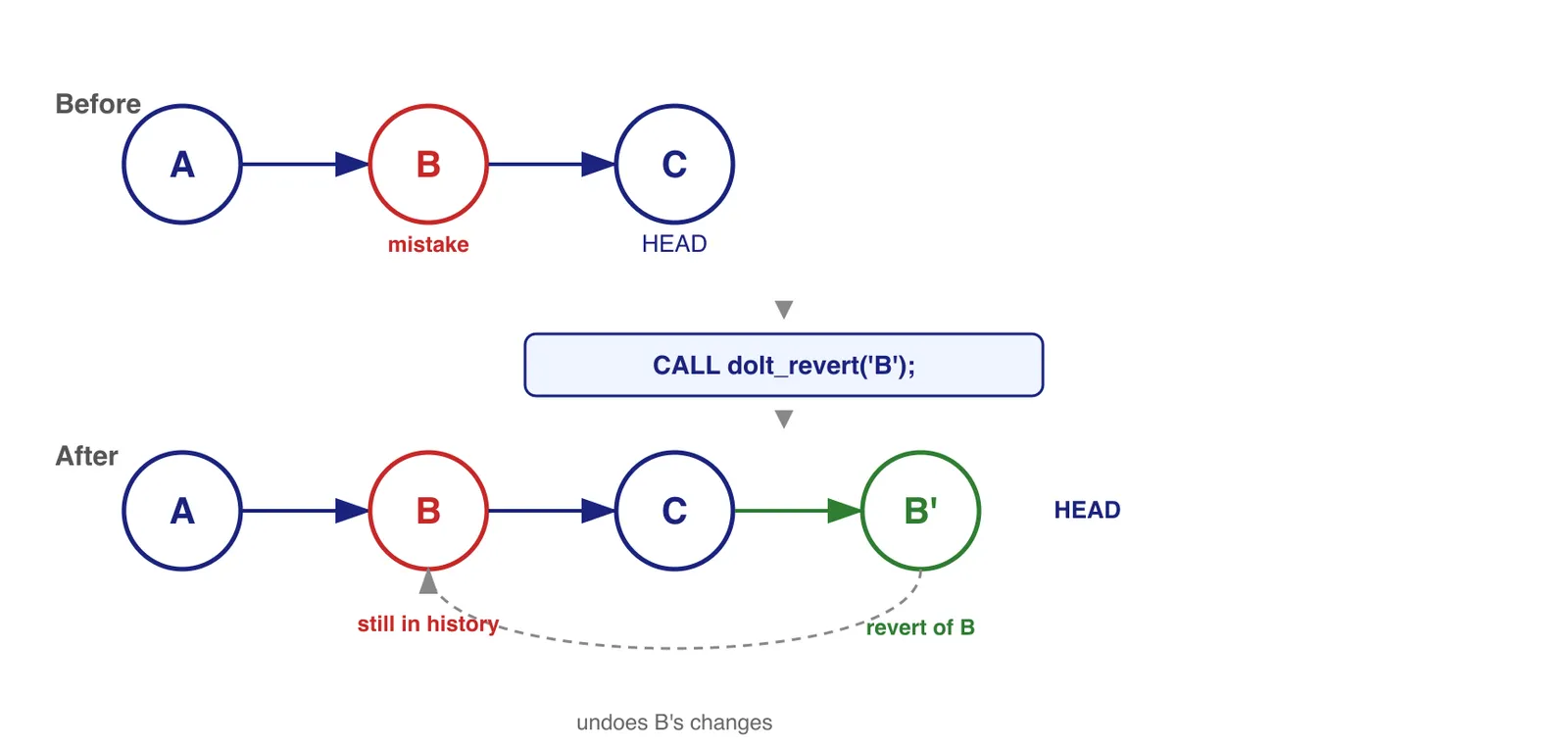
One of those “undo” tools is dolt revert (and its SQL counterpart, the dolt_revert() stored procedure). Just like git revert, dolt revert creates a new commit that undoes the changes introduced by a specific commit in your history, without destroying any of the history in between. It’s a safe, non-destructive way to undo a specific change while preserving the full audit trail of what happened.
We recently shipped an enhancement to dolt revert: it now supports conflict resolution. Previously, if reverting a commit produced conflicts with changes made after that commit, the revert would fail entirely. Now, Dolt puts you into the same familiar conflict resolution workflow used for merge conflicts and cherry-pick conflicts, giving you full control to resolve those conflicts and complete the revert.
dolt_revert()#
dolt_revert() is a SQL stored procedure that reverts a specific commit (or a set of commits). It applies the inverse of the changes from the specified commit as a new commit on top of HEAD.
CALL dolt_revert('commit_hash');If a commit added rows to a table, the revert removes those rows. If a commit updated values, the revert restores the original values. The resulting commit message indicates which commit was reverted, preserving a clear audit trail.
This is different from dolt_reset(), which moves the branch pointer backward in history and can discard commits entirely. dolt_revert() is the right choice when you want to undo a specific change while keeping your full history intact.
A Concrete Example#
Conflicts occur during a revert when the rows modified by the commit being reverted have also been changed by a later commit. Dolt can’t automatically determine the correct value because the current state of the data has diverged from what the revert expects to find.
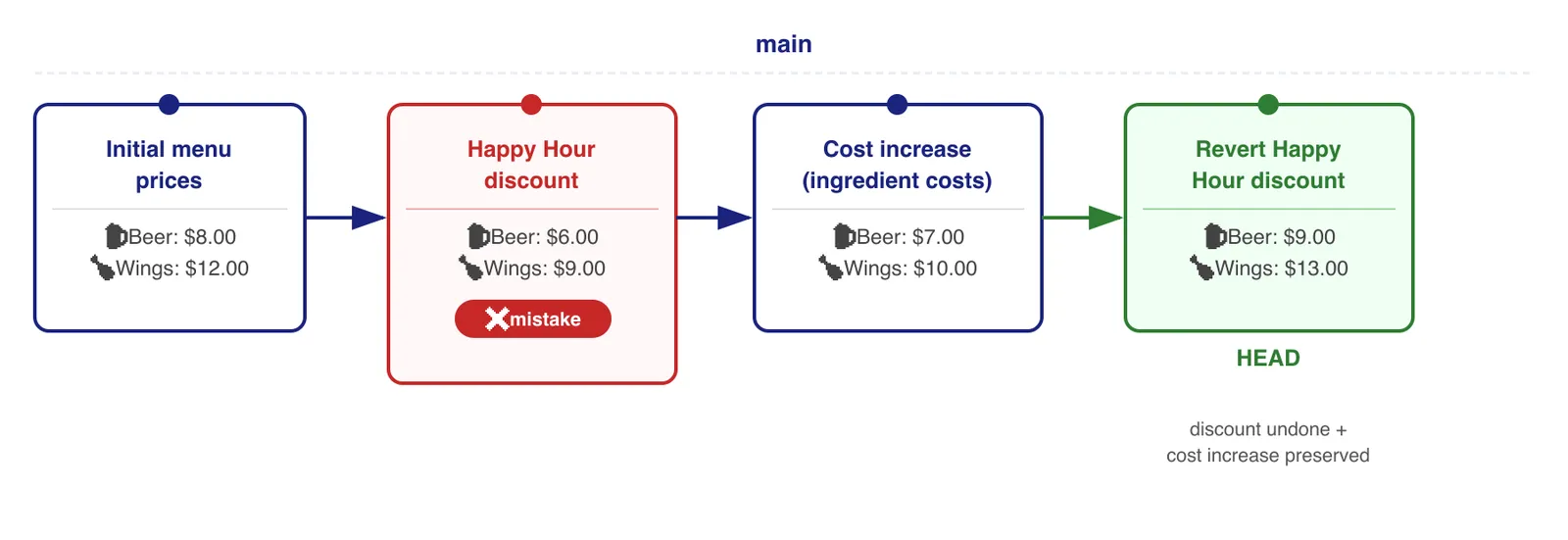
Let’s look at an example with a restaurant using Dolt to manage their menu and prices. When happy hour pricing doesn’t get applied automatically, a new employee with good intentions manually changes the price of beer and wings (Commit B), thinking they needed to directly edit the prices for Happy Hour. This ends up permanently lowering the prices though, and we’ll need to undo this change later, but not before another price change is entered, due to increasing costs from a supplier (Commit C).
- Commit A: Initial data, with beer’s
priceset to $8.00 - Commit B: Mistaken, permanent discount applied, changing beer’s
priceto $6.00 - Commit C: Price increase due to ingredient costs, beer’s
priceraised to $7.00
After finding this mistake, we want to revert Commit B. The revert of B will try to change beer_price from 6.00 back to 8.00. The problem is the current value is 7.00, not 6.00 — Commit C already changed it. Dolt flags this as a conflict because it can’t automatically know whether you want 8.00 (full revert, ignoring the cost increase) or 9.00 (revert the discount, but keep the cost increase) or something else entirely. The right choice for resolving conflicts depends on the application.
Demo#
Let’s walk through the scenario above with Dolt. Here’s an overview of the data changes, including the mistaken change and the revert that fixed it. At the end of the demo, our commit history will look like this:
If you don’t have Dolt yet, install it here.
$ mkdir menudb; cd menudb
$ dolt init
$ dolt sql
menudb/main>
Create the menu table and add some initial prices:
menudb/main> CREATE TABLE menu_items (
    item_id   INT PRIMARY KEY,
    item_name VARCHAR(100) NOT NULL,
    price     DECIMAL(10, 2) NOT NULL
);

menudb/main*> INSERT INTO menu_items VALUES
    (1, 'Burger', 10.00),
    (2, 'Fries',   5.00),
    (3, 'Beer',    8.00),
    (4, 'Wings',  12.00),
    (5, 'Soda',    4.00);

menudb/main*> CALL dolt_commit('-Am', 'Initial menu prices');
The next change is where our well-meaning employee mistakenly lowers the price of beer and wings permanently, thinking he was just turning on Happy Hour prices:
menudb/main> UPDATE menu_items SET price = 6.00 WHERE item_name = 'Beer';
menudb/main*> UPDATE menu_items SET price = 9.00 WHERE item_name = 'Wings';
menudb/main*> CALL dolt_commit('-am', 'Apply Happy Hour discount to Beer and Wings');
Later that same day, a notice arrives from the supplier that ingredient costs are going up. The manager updates prices to reflect that:
menudb/main> UPDATE menu_items SET price = 11.00 WHERE item_name = 'Burger';
menudb/main*> UPDATE menu_items SET price =  7.00 WHERE item_name = 'Beer';
menudb/main*> UPDATE menu_items SET price = 10.00 WHERE item_name = 'Wings';
menudb/main*> CALL dolt_commit('-am', 'Price increases due to ingredient costs');
The next morning, the manager reviews the menu and notices beer and wings are still at discounted prices. The Happy Hour price changes were never supposed to be permanent! Time to revert it. We can see the full history with dolt log:
menudb/main> SELECT commit_hash, message FROM dolt_log LIMIT 4;
+----------------------------------+--------------------------------------------+
| commit_hash                      | message                                    |
+----------------------------------+--------------------------------------------+
| 984fnl723j15lpc2qsef16s671c64vtt | Price increases due to ingredient costs    |
| l4odro9rnp9js2etbedqrch9scpjh6h7 | Apply Happy Hour discount to Beer and Wings|
| 6brcbpecq023ha03lleoacp1ofd0lqsi | Initial menu prices                        |
| ...                              | ...                                        |
+----------------------------------+--------------------------------------------+
To allow Dolt to surface conflicts for manual resolution rather than aborting, we first disable autocommit:
menudb/main> SET autocommit = 0;
menudb/main> CALL dolt_revert('l4odro9rnp9js2etbedqrch9scpjh6h7');
+------+----------------+------------------+-----------------------+
| hash | data_conflicts | schema_conflicts | constraint_violations |
+------+----------------+------------------+-----------------------+
|      | 1              | 0                | 0                     |
+------+----------------+------------------+-----------------------+

Warning (Code 1105): merge has unresolved conflicts or constraint violations
The data_conflicts: 1 means one table has conflicts. Let’s look at the details:
menudb/main*> SELECT * FROM dolt_conflicts;
+------------+---------------+
| table      | num_conflicts |
+------------+---------------+
| menu_items | 2             |
+------------+---------------+
Two conflicting rows — one for Beer, one for Wings. The dolt_conflicts_menu_items table has the full details:
menudb/main*> SELECT base_item_name, base_price,
                     our_item_name,  our_price,
                     their_item_name, their_price
              FROM dolt_conflicts_menu_items;
+----------------+------------+---------------+-----------+-----------------+-------------+
| base_item_name | base_price | our_item_name | our_price | their_item_name | their_price |
+----------------+------------+---------------+-----------+-----------------+-------------+
| Beer           | 6.00       | Beer          | 7.00      | Beer            | 8.00        |
| Wings          | 9.00       | Wings         | 10.00     | Wings           | 12.00       |
+----------------+------------+---------------+-----------+-----------------+-------------+
Each conflict row gives us a three-way view of the data:
base: The values in the commit being reverted — the mistaken Happy Hour prices ($6.00 Beer, $9.00 Wings).ours: The current state at HEAD, after the ingredient cost increases ($7.00 Beer, $10.00 Wings).theirs: What the revert wants to restore — the prices before the Happy Hour discount was applied ($8.00 Beer, $12.00 Wings).
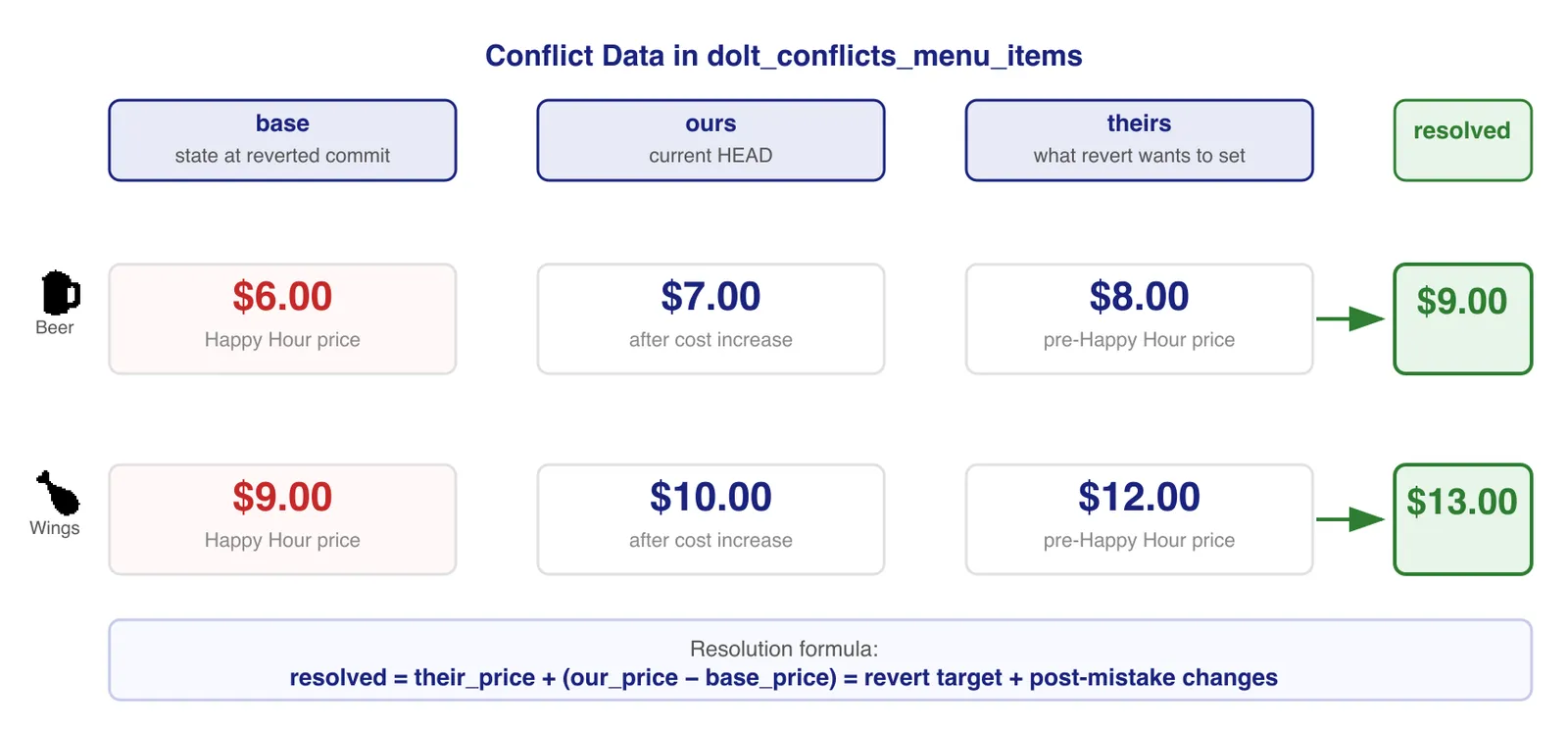
This three-way merge information gives us everything we need to make the right call. We want to undo the Happy Hour discount and keep the ingredient cost increase that was committed afterward. We can compute the correct price for each item directly from these three values:
their_price + (our_price - base_price)For Beer: $8.00 + ($7.00 − $6.00) = $9.00
For Wings: $12.00 + ($10.00 − $9.00) = $13.00
The logic: their_price is what the price should be once the discount is removed, and (our_price - base_price) captures the delta from the cost increase that happened on top of the discount. Adding them together gives us the price that correctly reflects both the reverted discount and the subsequent cost increase.
We can express this as a single SQL statement that will update the data in the menu_item table to be the values we want.
menudb/main*> UPDATE menu_items mi
              JOIN dolt_conflicts_menu_items dc ON mi.item_id = dc.our_item_id
              SET mi.price = dc.their_price + (dc.our_price - dc.base_price);
Let’s verify the results:
menudb/main*> SELECT item_name, price FROM menu_items ORDER BY item_id;
+-----------+-------+
| item_name | price |
+-----------+-------+
| Burger    | 11.00 |
| Fries     |  5.00 |
| Beer      |  9.00 |
| Wings     | 13.00 |
| Soda      |  4.00 |
+-----------+-------+
Beer is $9.00 and Wings are $13.00 — Happy Hour mistake undone, ingredient cost increase preserved! Now we just need to delete the conflict records to mark them as resolved and commit:
menudb/main*> DELETE FROM dolt_conflicts_menu_items;
Query OK, 2 rows affected (0.00 sec)

menudb/main*> CALL dolt_commit('-am', 'Revert Happy Hour discount, preserving cost increases');
+----------------------------------+
| hash                             |
+----------------------------------+
| hbm30ho3vset294mtp47epecermqvem9 |
+----------------------------------+
The revert is complete. The Happy Hour discount is undone, the cost increases are preserved, and the full history (including the original mistake and how it was corrected) is permanently in the commit log.
Summary#
dolt revert is an important tool in Dolt to help you maintain correct data. The ability to surgically undo a specific commit, even when it’s buried under subsequent changes, is something you simply can’t do with a traditional database.
The new conflict resolution support makes it even more powerful. Previously, a revert that conflicted with later changes would fail outright. Now, instead of giving up, Dolt hands you the full three-way merge picture — the state of the data in the reverted commit, the current state at HEAD, and what the revert is trying to restore — and lets you resolve each conflict exactly the way your application requires.
Revert can be useful in lots of situations beyond manually fixing data. For example, you could use revert to build an automated pipeline where bad data changes could be walked back even after subsequent changes have been layered on top.
For more on conflict resolution in Dolt, check out our post on programmatic data conflict resolution. And if you run into any issues or have questions, we’d love to hear from you on Discord or GitHub.